

Configure OpenSearch for advanced search Pro
Plane uses OpenSearch to provide advanced search capabilities across your workspace. This guide walks you through setting up OpenSearch integration on your self-hosted instance.
Before you begin
You'll need:
- An OpenSearch instance running version 2.19 or later (self-hosted or managed service like AWS OpenSearch).
What you get with advanced search
Once configured, advanced search provides:
- Full-text search across work items, projects, cycles, modules, pages, and more
- Fuzzy matching that tolerates typos and variations in spelling
- Autocomplete with instant suggestions as you type
- Multi-entity search that searches across all content types in a single query
Users can access advanced search using the global search shortcut (Cmd/Ctrl + K) or search within specific projects and sections.
Configure OpenSearch
Set environment variables in your Plane configuration. See Environment variables reference for details.
For Docker deployments
Add configuration to your environment file
Edit
/opt/plane/plane.env.bash# OpenSearch Settings OPENSEARCH_ENABLED=1 OPENSEARCH_URL=https://your-opensearch-instance:9200/ OPENSEARCH_USERNAME=admin OPENSEARCH_PASSWORD=your-secure-password OPENSEARCH_INDEX_PREFIX=planeRestart Plane services
bashprime-cli restartor if managing containers directly:
bashdocker compose down docker compose up -dCreate search indices
Access the API container and create the necessary indices:
bash# Access the API container docker exec -it plane-api-1 sh # Create all search indices (run once) python manage.py manage_search_index index rebuild --forceIndex your existing data
Index all existing content into OpenSearch:
bash# For small datasets python manage.py manage_search_index document index --force # For large datasets (recommended) python manage.py manage_search_index --background document index --forceThe background option processes indexing through Celery workers, which is better for instances with large amounts of data.
For Kubernetes deployments
The Plane Helm chart provides auto-setup for OpenSearch. If you're using your own OpenSearch instance, configure it through Helm values.
Configure Helm values
Get the current values file:
bashhelm show values plane/plane-enterprise > values.yamlEdit
values.yamlto add OpenSearch configuration:yamlenv: # OpenSearch configuration opensearch_remote_url: "https://your-opensearch-instance:9200/" opensearch_remote_username: "admin" opensearch_remote_password: "your-secure-password" opensearch_index_prefix: "plane"Refer to the Plane Helm chart documentation for complete values structure.
Upgrade your deployment
bashhelm upgrade --install plane-app plane/plane-enterprise \ --create-namespace \ --namespace plane \ -f values.yaml \ --timeout 10m \ --wait \ --wait-for-jobsCreate search indices
Run these commands in the API pod.
bash# Get the API pod name API_POD=$(kubectl get pods -n plane --no-headers | grep api | head -1 | awk '{print $1}') # Create all search indices (run once) kubectl exec -n plane $API_POD -- python manage.py manage_search_index index rebuild --forceIndex your existing data Run these commands in the API pod.
bash# For small datasets kubectl exec -n plane $API_POD -- python manage.py manage_search_index document index --force # For large datasets (recommended) kubectl exec -n plane $API_POD -- python manage.py manage_search_index --background document index --force
Verify the setup
Check OpenSearch connection
Test that Plane can connect to your OpenSearch instance:
# Access your API container or pod
docker exec -it plane-api-1 sh  # For Docker
# OR
kubectl exec -n plane $API_POD -- sh  # For Kubernetes

# Start Python shell
python manage.py shell
Then run:
from django.conf import settings
from opensearchpy import OpenSearch

client = OpenSearch(
    hosts=[settings.OPENSEARCH_DSL['default']['hosts']],
    http_auth=settings.OPENSEARCH_DSL['default']['http_auth'],
    use_ssl=True,
    verify_certs=False
)

# Check cluster health
print(client.cluster.health())

# List indices - you should see your Plane indices
print(client.cat.indices(format='json'))
Verify indices were created
List all created indices:
python manage.py manage_search_index listYou should see indices for work items, projects, cycles, modules, pages, and other searchable entities.
Test search functionality
- Sign in to your Plane instance.
- Press Cmd/Ctrl + K to open global search.
- Type a search query and verify results appear.
- Test search within projects, work items, and pages.
Maintenance
Resync data
If search results become stale or inconsistent, resync your data:
python manage.py manage_search_index document index --forceThis reindexes all content without recreating the index structure.
Complete rebuild
For a complete reset (recreates indices and reindexes all data):
# Recreate all indices
python manage.py manage_search_index index rebuild --force

# Reindex all documents
python manage.py manage_search_index document index --force
Use this if index structure needs updating or if you're experiencing persistent issues.
Monitor logs
Check API logs OpenSearch-related errors:
Docker:
docker compose logs api | grep -i opensearchKubernetes:
kubectl logs -n plane -l app.kubernetes.io/component=api | grep -i opensearchUnderstanding how it works
Advanced search in Plane maintains search indices separately from your main database. This separation is why search can be fast even with thousands of work items - OpenSearch is purpose-built for search operations, while your database handles transactional operations.
Why Plane uses OpenSearch
Traditional database searches struggle with fuzzy matching and typos. If you search for "authentcation" (with a typo), a database won't find "authentication". OpenSearch handles this naturally because it analyzes text differently - it breaks words into tokens, normalizes variations, and understands linguistic patterns.
This is why autocomplete feels instant. OpenSearch pre-processes text to match partial words, while your database would need to scan entire tables to achieve similar results.
The synchronization challenge
The trade-off with separate search indices is keeping them synchronized with your database. When someone updates a work item, that change must reach OpenSearch for search results to remain accurate.
Plane solves this through an event-driven architecture. Every time data changes in your database, Django emits a signal. These signals trigger updates to OpenSearch.
Batching for efficiency
Direct, immediate updates would overwhelm both your database and OpenSearch. Imagine a user creating 50 work items in quick succession, that would mean 50 separate API calls to OpenSearch, each with network overhead.
Instead, Plane batches updates through Redis. When a signal fires, the update goes into a Redis queue. A Celery worker processes this queue every 5 seconds, combining multiple updates into efficient batch operations. This is why you might notice a brief delay (up to 5 seconds) before new content appears in search results.
The batching pattern also provides resilience. If OpenSearch is temporarily unavailable, updates accumulate in Redis and process once connectivity returns. This requires Redis 6.2+ which supports the LPOP count operation needed for efficient batch retrieval.
The complete flow
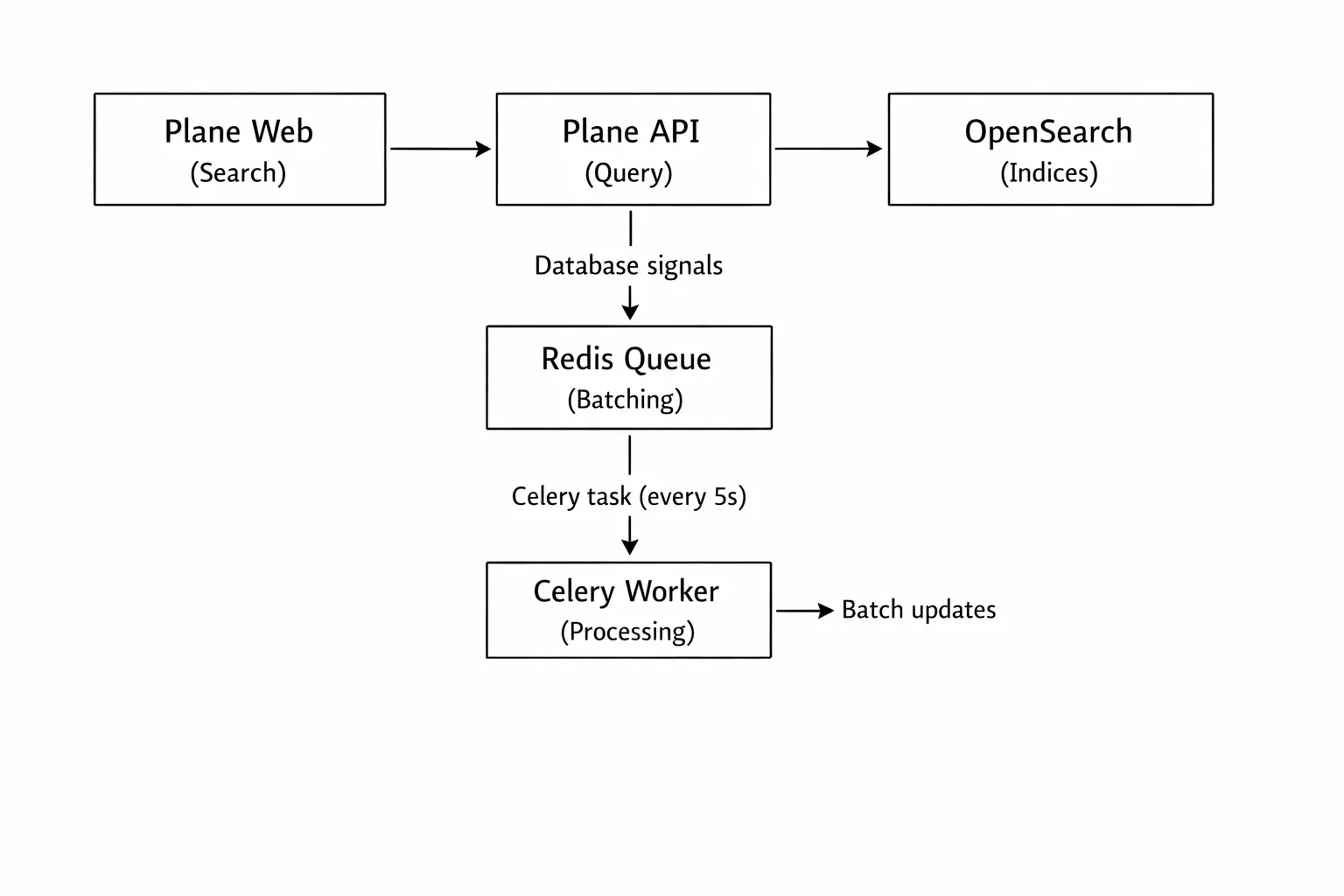
When you search, queries bypass this synchronization process entirely. The Plane API sends your search query directly to OpenSearch, which returns results almost instantly. Your database isn't involved in search queries at all — this is the key to search performance.
Index organization
Plane creates nine separate indices in OpenSearch, one for each searchable entity type. This separation might seem redundant - why not put everything in one index?
The answer lies in how different entities need different search behaviors. Work items use fuzzy matching and field prioritization (title matches rank higher than description matches). Projects emphasize metadata filtering—status, member counts, and timelines. Pages analyze long-form content structure.
Each index is optimized for its content type:
| Index | Content | Search Features |
|---|---|---|
{prefix}_issues | Work items | Full-text search, field weighting (title > description), state filtering |
{prefix}_issue_comments | Comments | Comment search within work items, parent-child relationships |
{prefix}_projects | Projects | Project discovery, metadata filtering (dates, counts, status) |
{prefix}_cycles | Cycles | Cycle search, time-based filtering and aggregations |
{prefix}_modules | Modules | Module/sprint search, planning aggregations |
{prefix}_pages | Pages | Page content search, rich text analysis for long-form content |
{prefix}_workspaces | Workspaces | Workspace search and discovery |
{prefix}_issue_views | Saved views | Saved view search and filtering |
{prefix}_teamspaces | Teamspaces | Teamspace discovery |
The {prefix} is whatever you configured in OPENSEARCH_INDEX_PREFIX, or empty if you didn't set a prefix. This prefix exists because you might run multiple Plane instances pointing to the same OpenSearch cluster. The prefix prevents different instances from accidentally sharing or conflicting with each other's indices.