

Airgapped deployment architecture
INFO
Airgapped deployments are available exclusively for Enterprise Grid customers with a minimum commitment of 100 seats. Contact our Sales team for trials, exceptions to the seat cut-off, tailored pricing, and licensing info.
This document explains Plane's architecture and specific requirements for airgapped deployments. Review this before beginning your airgapped installation on Docker or Kubernetes.
What is an airgapped deployment?
An airgapped deployment operates in a completely isolated network environment with no external internet connectivity. This isolation is common in highly regulated industries, government facilities, and organizations with strict security requirements.
Plane supports fully airgapped deployments where all components - application services, databases, storage, and integrations - operate entirely within your isolated network perimeter.
Deployment methods
Plane's Airgapped Edition can be deployed using Docker or Kubernetes. Choose the method that best fits your infrastructure.
Docker
Kubernetes
Airgapped cluster architecture
Here's how Plane operates in an airgapped environment with internal enterprise applications:
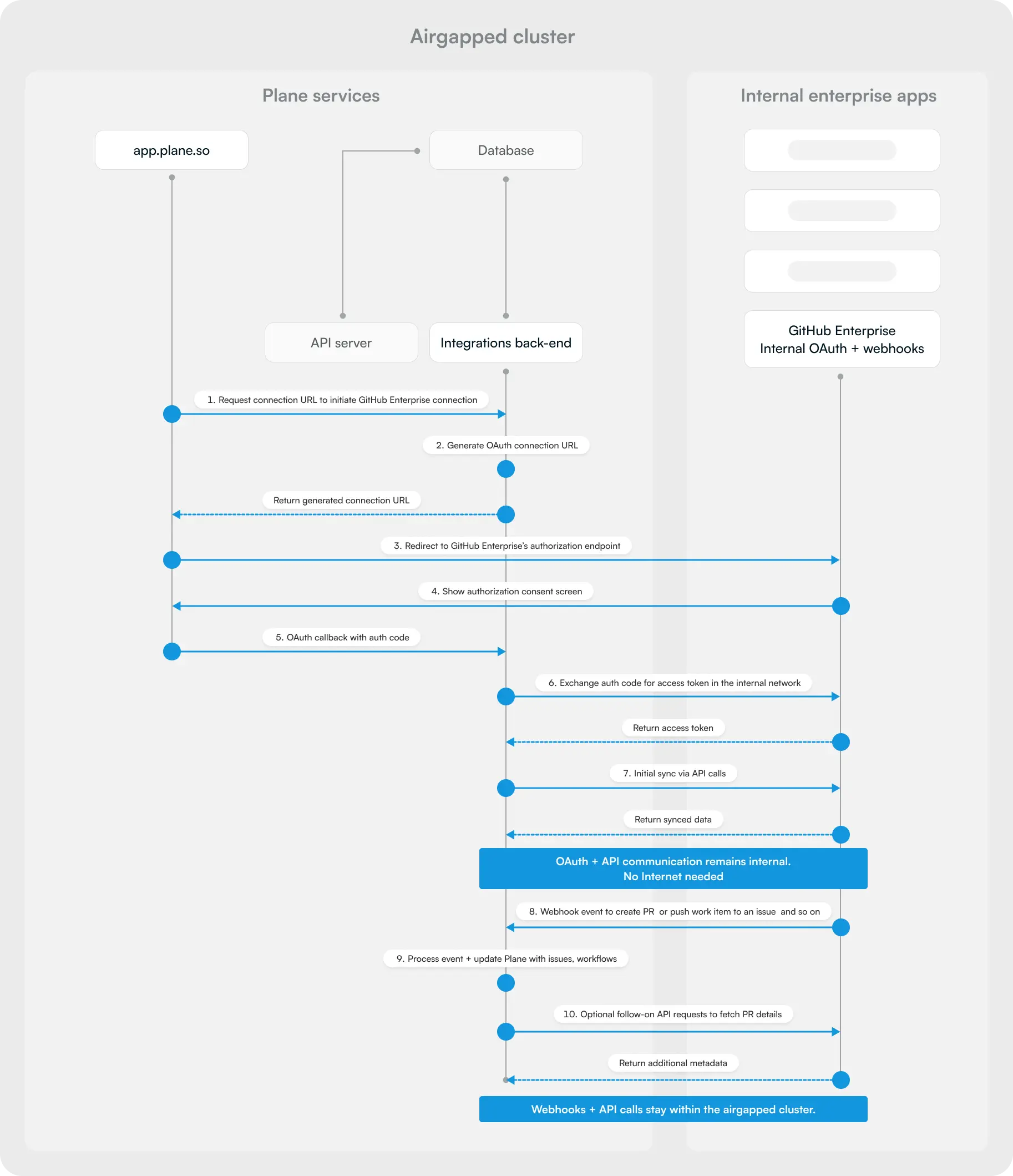
This diagram illustrates a critical principle: all OAuth flows and API communication remain internal to the airgapped cluster. When integrating with self-hosted GitHub Enterprise, GitLab, or other internal services, the entire authentication and data exchange happens within your isolated network — no internet access required.
For a detailed breakdown of Plane's services and infrastructure dependencies, see Plane self-hosted architecture.
Critical guarantees for airgapped environments
No telemetry
Plane does not send application data, usage metrics, or telemetry outside the cluster. No analytics, crash reports, or usage statistics leave your network.Offline licensing
License validation happens through uploaded license files downloaded from the Prime portal. No internet connection required after initial license file transfer.Zero external dependencies
After initial image import, no external network connectivity is required for Plane to operate. All features work entirely within your isolated environment.Internal-only communication
All service-to-service communication stays within your cluster. Services never attempt to reach external APIs, CDNs, or third-party services.
How integrations stay internal
The airgapped cluster diagram above shows the complete data flow. Key points:
- OAuth providers - Your internal GitHub Enterprise or GitLab instance acts as the OAuth provider
- Authorization endpoints - All OAuth URLs point to internal systems, never external SaaS services
- API communication - Plane makes API calls only to your internal instances
- Webhook delivery - Internal systems send webhooks to Plane's internal endpoints
- No SaaS fallback - Plane never attempts to reach github.com, gitlab.com, or slack.com APIs
This architecture ensures complete network isolation while maintaining full integration functionality.
Kubernetes-specific requirements
Base environment
Deploying airgapped Plane via Kubernetes requires preparing all dependencies to operate without any external network access.
Container images and artifacts
- Maintain an internal OCI or container registry to host all Plane service images
- Prepare a controlled process to pull, verify, and mirror Plane container images and Helm charts from an online staging environment into the airgapped registry
Kubernetes environment
Supported versions: Kubernetes 1.31 – 1.33
Required components:
- IngressClass configured
- StorageClass available
- cert-manager configured with an internal CA
Node requirements:
- Ensure node OS dependencies and container runtime packages are available from mirrored package repositories like apt, yum, or offline bundles
Scaling
Horizontal scaling is handled via replica counts configurable in values.yaml.
Plane avoids using StatefulSets where possible due to the complexity of scaling stateful workloads in Kubernetes. The monitor service uses a StatefulSet.
For airgapped clusters:
- Ensure metrics-server images are mirrored if using HPA
- If using node autoscaling, ensure node images are pre-loaded and registries accessible on bootstrap
Secrets management
Plane supports using existing external secret stores, provided they are reachable within the airgapped environment:
- AWS Secrets Manager for private VPC with no internet
- HashiCorp Vault
- Self-hosted Bitwarden
- Kubernetes Secrets
- SOPS, sealed-secrets, if preferred
Additional considerations
- Ensure all secret providers can function without external network access
- cert-manager must use an internal certificate authority
- Keys and secret rotation policies should be part of the airgap operational procedures